
Buffer Overflows
For this example, look at overflow-3 folder. Inside this folder, you’ll find the following C code.

This example will cover some of the more interesting, and useful things you can do with a buffer overflow. In the previous examples, we’ve seen that when a program takes users controlled input, it may not check the length, and thus a malicious user could overwrite values and actually change variables.
In this example, in the copy_arg function we can see that the strcpy function is copying input from a string(which is argv[1] which is a command line argument) to a buffer of length 140 bytes. With the nature of strcpy, it does not check the length of the data being input so here it’s also possible to overflow the buffer - we can do something more malicious here.
Let’s take a look at what the stack will look like for the copy_arg function(this stack excludes the stack frame for the strcpy function):
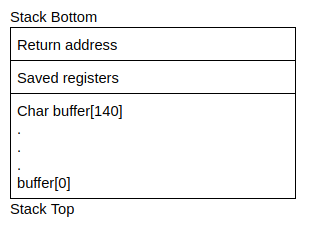
Earlier, we saw that when a function(in this case main) calls another function(in this case copy_args), it needs to add the return address on the stack so the callee function(copy_args) knows where to transfer control to once it has finished executing. From the stack above, we know that data will be copied upwards from buffer[0] to buffer[140]. Since we can overflow the buffer, it also follows that we can overflow the return address with our own value. We can control where the function returns and change the flow of execution of a program(very cool, right?)
Know that we know we can control the flow of execution by directing the return address to some memory address, how do we actually do something useful with this. This is where shellcode comes in; shell code quite literally is code that will open up a shell. More specifically, it is binary instructions that can be executed. Since shellcode is just machine code(in the form of binary instructions), you can usually start of by writing a C program to do what you want, compile it into assembly and extract the hex characters(alternatively it would involve writing your own assembly). For now we’ll use this shellcode that opens up a basic shell:
\x48\xb9\x2f\x62\x69\x6e\x2f\x73\x68\x11\x48\xc1\xe1\x08\x48\xc1\xe9\x08\x51\x48\x8d\x3c\x24\x48\x31\xd2\xb0\x3b\x0f\x05
So why don’t we looking at actually executing this shellcode. The basic idea is that we need to point the overwritten return address to the shellcode, but where do we actually store the shellcode and what actual address do we point it at? Why don’t we store the shellcode in the buffer - because we know the address at the beginning of the buffer, we can just overwrite the return address to point to the start of the buffer. Here’s the general process so far:
- Find out the address of the start of the buffer and the start address of the return address
- Calculate the difference between these addresses so you know how much data to enter to overflow
- Start out by entering the shellcode in the buffer, entering random data between the shellcode and the return address, and the address of the buffer in the return address
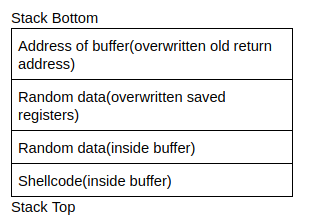
In theory, this looks like it would work quite well. However, memory addresses may not be the same on different systems, even across the same computer when the program is recompiled. So we can make this more flexible using a NOP instruction. A NOP instruction is a no operation instruction - when the system processes this instruction, it does nothing, and carries on execution. A NOP instruction is represented using \x90. Putting NOPs as part of the payload means an attacker can jump anywhere in the memory region that includes a NOP and eventually reach the intended instructions. This is what an injection vector would look like:

python -c “print (NOP * no_of_nops + shellcode + random_data * no_of_random_data + memory address)”`
Using this format would be something like this for this challenge:
python -c “print(‘\x90’ * 30 + ‘\x48\xb9\x2f\x62\x69\x6e\x2f\x73\x68\x11\x48\xc1\xe1\x08\x48\xc1\xe9\x08\x51\x48\x8d\x3c\x24\x48\x31\xd2\xb0\x3b\x0f\x05’ + ‘\x41’ * 60 + ‘\xef\xbe\xad\xde’) | ./program_name”
In some cases you may need to pass xargs before ./program_name.
No comments to display
No comments to display