
Introduction
My Homelab Project
Welcome to the documentation for my personal homelab project. This repository contains a collection of guides, configuration files, and schematics that detail the setup and configuration of my homelab environment.
The primary goal of this project is to create a robust and flexible homelab environment for learning, experimentation, and self-hosting various services.
Architecture Overview
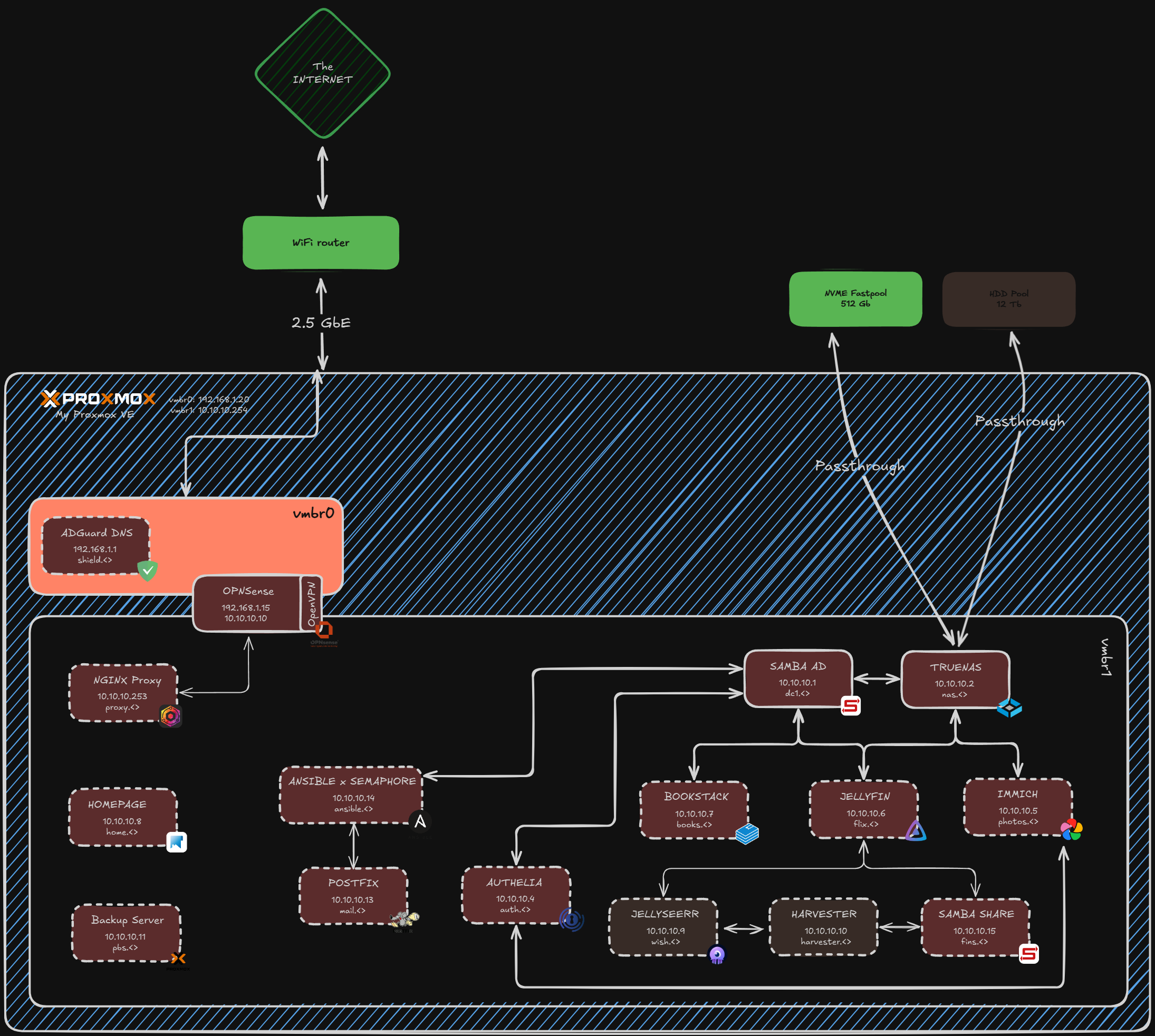
The following diagram illustrates the overall architecture of the homelab:
Documentation
This documentation is divided into the following sections:
- 1. Hardware: An overview of the hardware used in this homelab.
- 2. Host Setup:
- Installing Proxmox: A step-by-step guide to installing and configuring Proxmox VE.
- (Optional) Disabling IPv6: Instructions on how to disable IPv6 on the Proxmox host or inside the LXCs.
- 3. Core Infrastructure:
- Active Directory (SAMBA): Setting up a Samba-based Active Directory domain controller.
- (Optional) Managing SSL Certificates: Creating a custom CA and signing certificates for internal services.
- Truenas: Configuration of TrueNAS for network-attached storage.
- AdGuard: Setting up AdGuard for network-wide ad blocking.
- NGINX Proxy Manager: Configuring NGINX Proxy Manager for reverse proxying services.
- 4. Authentication:
- Authelia: Implementing Authelia for single sign-on (SSO) and two-factor authentication.
- 5. Services:
Getting Started
To get started, you can begin by reviewing the Hardware section to understand the physical components of the homelab or you can jump to the Installing Proxmox guide to set up the virtualization host.
No comments to display
No comments to display